Debug pytest tests with Smello
Terminal output tells you which pytest case failed, but comparing parametrized runs or matching a failure to captured HTTP traffic requires more context. Smello records each function or method invocation as a separate event with its outcome, timings, fixtures, and traceback.
Setup
The bundled plugin supports pytest 7 and later.
Run pytest through Smello:
The bundled plugin loads automatically. You don't need to add a pytest plugin to conftest.py.
Example test:
test_pytest_tracking.py
The example contains one intentional assertion failure and one handled provider connection failure. Run it with log capture enabled:
smello run --capture-logs --log-level WARNING -- \
  pytest examples/python/test_pytest_tracking.py -v
Scenario: debugging one failing parameter
Suppose a discount test passes for a large order but fails for a small order:
def discounted_total(subtotal: int, discount_percent: int) -> int:
    return subtotal - discount_percent


@pytest.mark.parametrize(
    ("subtotal", "expected"),
    [(100, 90), (50, 45)],
    ids=["large-order", "small-order"],
)
def test_total_after_discount(subtotal, expected, discount_percent):
    assert discounted_total(subtotal, discount_percent) == expected
The first case passes by coincidence because 10 percent of 100 is 10. The second returns 40 instead of 45.
Debug in the dashboard
Open the Smello dashboard at http://localhost:5110, switch Group to Test file,
and select the failed parameter:
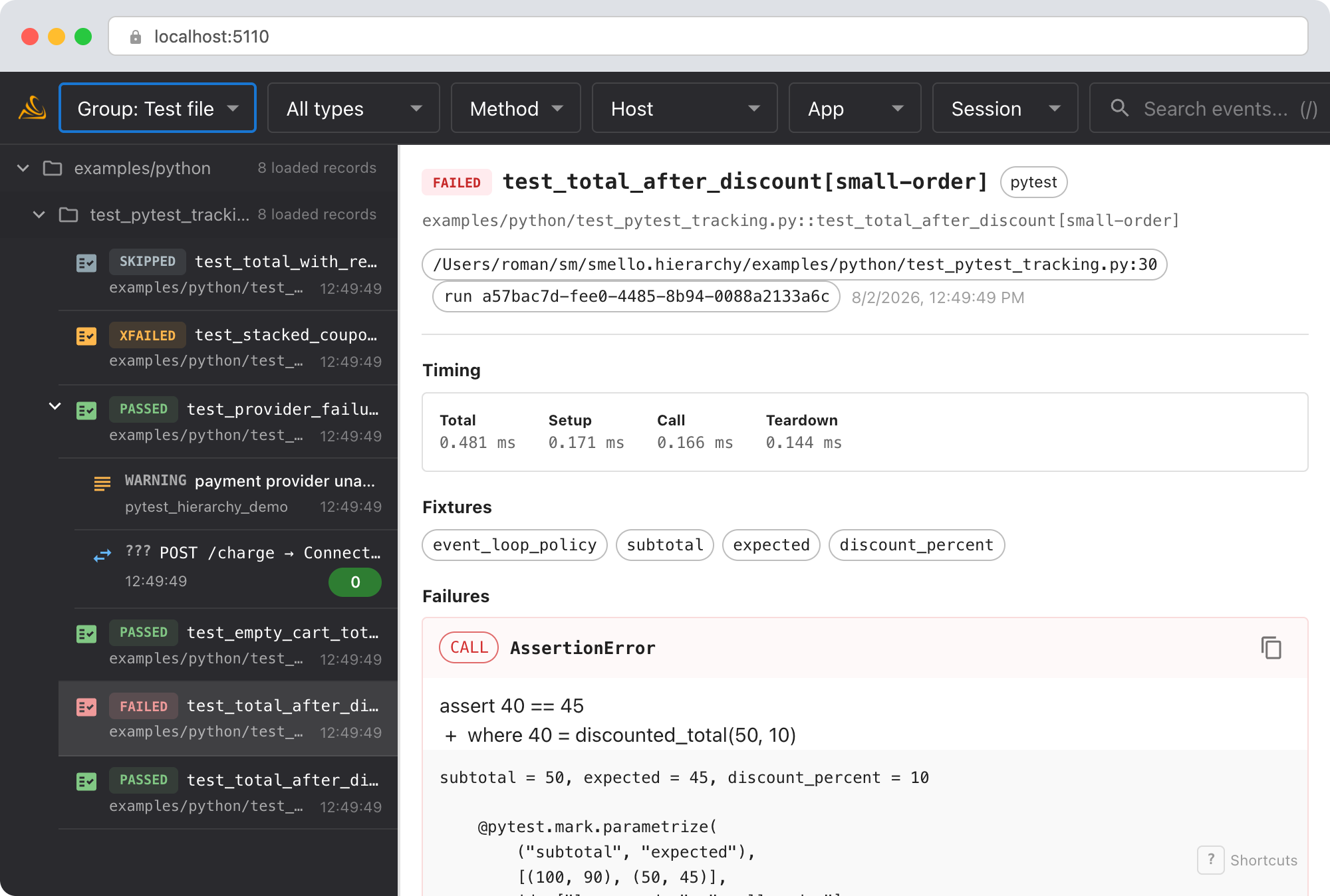
- Test ID: identifies the exact parameter, such as
test_total_after_discount[small-order]. - Status: distinguishes assertion failures from setup or teardown errors, skipped tests, expected failures, and unexpected passes.
- Timing: breaks the total into setup, call, and teardown phases.
- Fixtures: lists the fixture names requested by the test.
- Failures: shows the phase, exception type, assertion message, and traceback.
The file path appears above each test's runtime tree. None removes the virtual groups
while keeping runtime parenthood. In the example, test_provider_failure_is_handled
passes because it expects the connection error. Its runtime tree still contains the
failed Requests operation and the warning log attached to the test operation.
Debug with an AI agent
If you use Claude Code or another AI coding tool, the /smello skill can query test events and compare the failure with your source code. Install it once:
Then ask your agent:
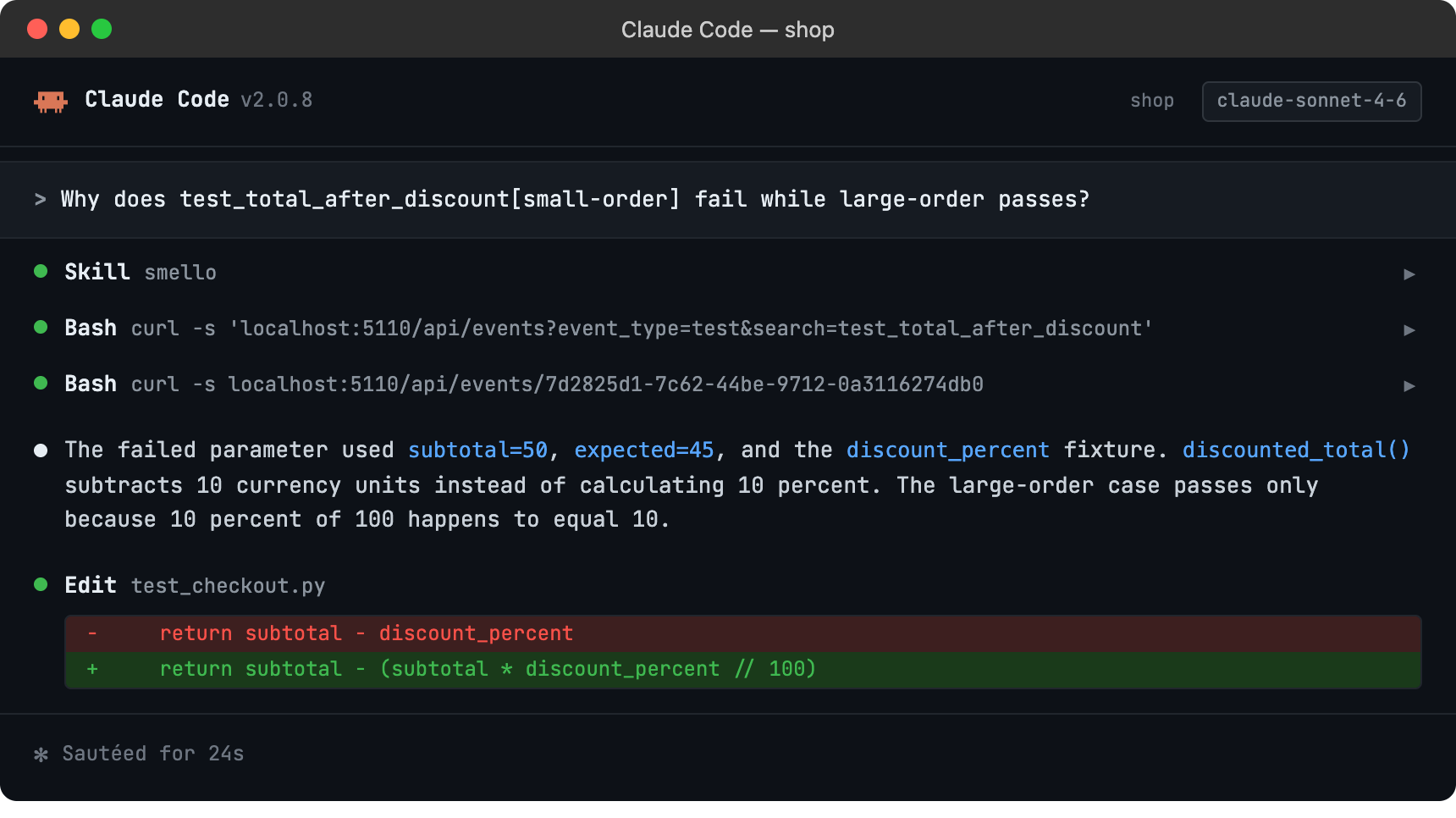
The skill is also invoked automatically when your agent recognizes a debugging question, but calling /smello explicitly gives the best results. See AI Agent Skills for compatible tools.
Tips
- Parametrization: Every parameter set gets its own event and keeps its full pytest node ID.
- Fixture values: Smello stores fixture names as structured data. The traceback generated by pytest may also include
repr()output for parameter, fixture, or local variable values. - Phase errors: Fixture setup and teardown failures use the
errorstatus. Assertion and other test-body failures usefailed. - Expected outcomes: Pytest
xfail,xpass, andskipoutcomes remain distinct in the timeline. - pytest-xdist: Events include the shared test run ID and worker ID, so parallel executions can be distinguished.
- Outgoing calls: Requests, HTTPX, aiohttp, botocore, and gRPC operations inherit the active test's collection groups. A caught network error remains visible as a failed child operation even when the test passes.
- Runtime annotations: Enable log capture to attach logs to the test or nested HTTP operation that emitted them.
- Opting out: Pass
--no-capture-testsor setSMELLO_CAPTURE_TESTS=falseto disable test events without disabling other capture types.
Next step: follow the getting started guide for installation, configuration, and more.