
Smello
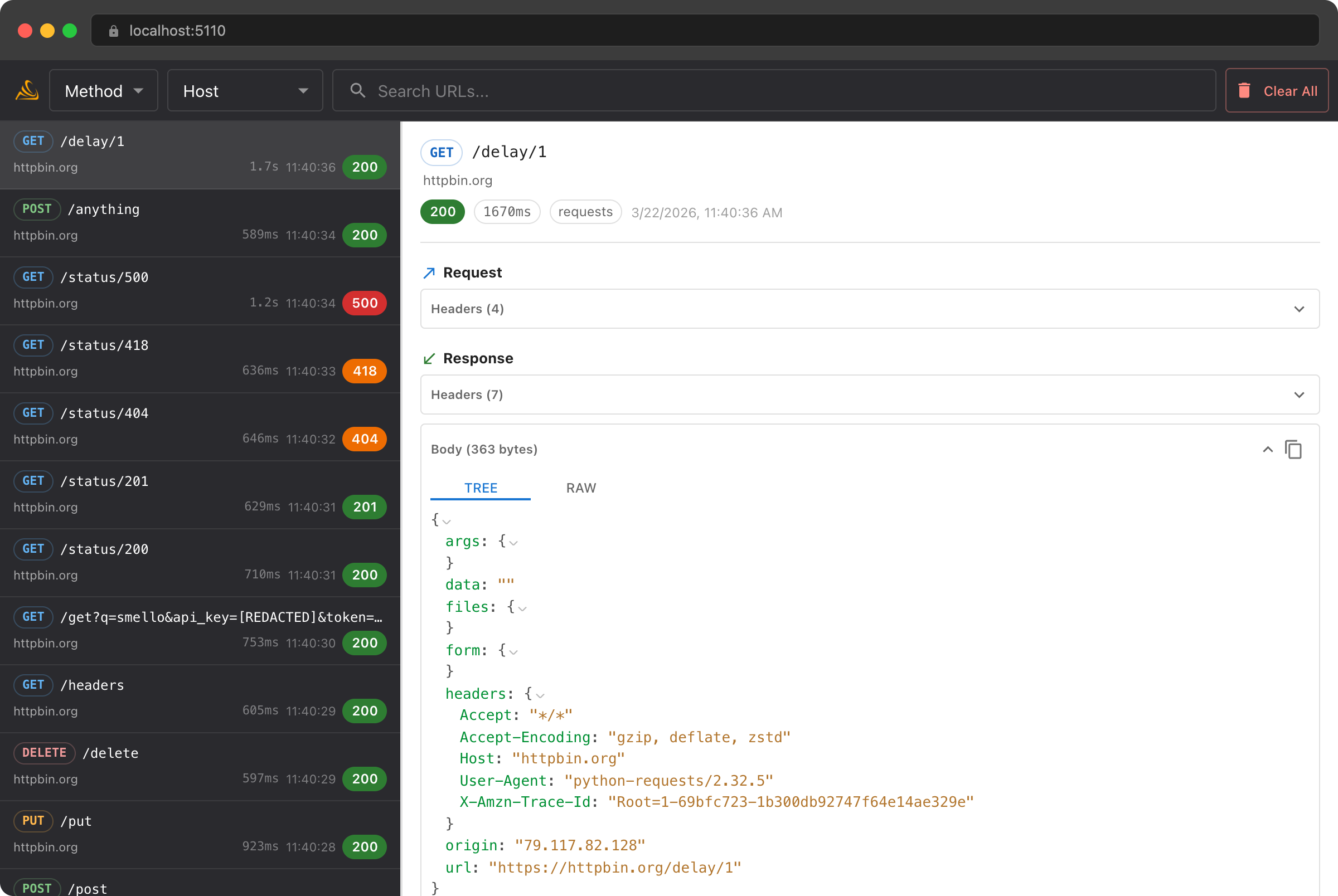
Debug your Python app locally. HTTP traffic, pytest results, logs, and exceptions in one dashboard. Zero code changes.
Why Smello?
Zero code changes
Prefix any command with smello run to capture HTTP requests, pytest results, exceptions, and logs. No imports or init calls.
Unified timeline
HTTP traffic, pytest results, log records, and crash tracebacks in one scrollable view. Filter by type or search across every event.
Hierarchy and data model →Full-stack visibility
See outgoing API calls from requests, httpx, aiohttp, grpc, and botocore. Smello also captures incoming FastAPI and Django requests, pytest results, Python logs, and unhandled exceptions.
LLM-aware
Calls to the OpenAI, Anthropic, and Gemini APIs render as a readable conversation instead of a wall of JSON. You see the system prompt, tool calls, and token usage at a glance.
Debug the OpenAI SDK →Explore the docs
Start with your first capture or jump to the reference you need.
Getting started
Install the client and server, run your first command, and inspect your first captured event.
Start here →Integration guides
Follow setup and debugging walkthroughs for supported libraries, SDKs, and frameworks.
Browse guides →Query captured events
Filter captured events or follow new ones from a running command with smello query.
Configuration
Find every CLI flag, SMELLO_* environment variable, and init() parameter.
Hierarchy and data model
See how sessions, apps, test files, and events nest, and what each captured event contains.
Understand the model →HTTP API
Read and filter captured events from your own scripts through the server's JSON API.
Read the API docs →AI Agent Skills
/smello-setup
Your AI agent detects your stack, installs Smello, and wires up smello run in your workflow.
/smello
Your AI agent queries captured events to diagnose failures: API errors, crashes, and log patterns.
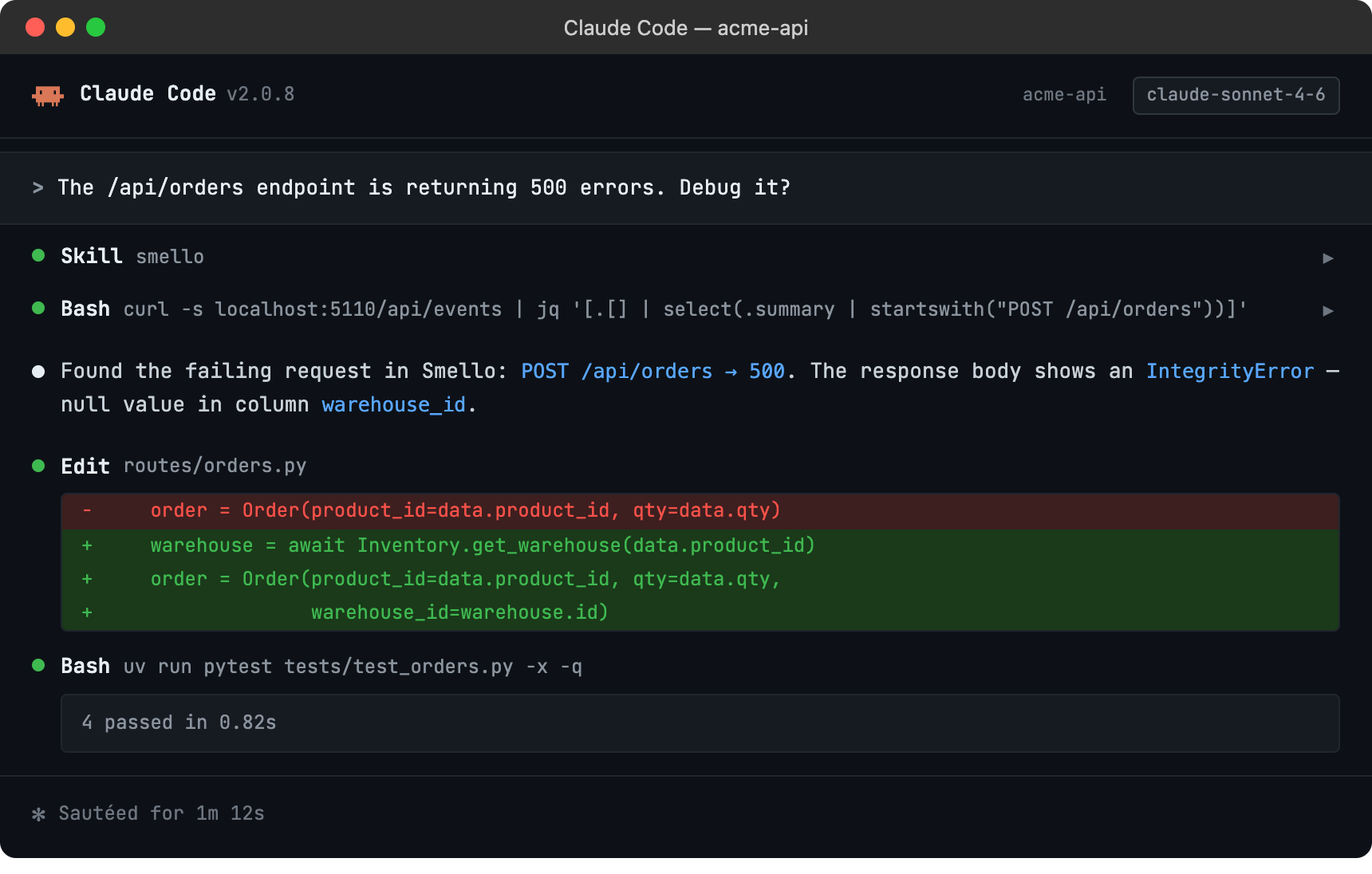
Works with Claude Code, Cursor, GitHub Copilot, and 20+ AI coding tools.
Works with
Outgoing HTTP and RPC libraries (auto-patched)
 requests
 httpx
httpx
 aiohttp
 gRPC
gRPC
 boto3 / AWS
 Google Cloud
 OpenAI SDK
 Anthropic SDK
 Gemini SDK
 Stripe SDK
Server frameworks (incoming request capture)
 FastAPI
 Django
Test frameworks (bundled plugin)
 pytest
How it works
1
Install
pip install smello smello-server
2
Start the server
smello-server
3
Run your code
smello run my_app.py
4
Browse requests, tests, logs & exceptions
http://localhost:5110
# Run any Python script or command
$ smello run my_app.py
$ smello run pytest tests/
$ smello run uvicorn app:app

# Enable log capture
$ smello run --capture-logs --log-level INFO my_app.py

# Filter to specific hosts
$ smello run --capture-host api.stripe.com my_app.py
Frequently asked questions
Does Smello add latency to my requests?
Smello doesn't send data synchronously from your application's HTTP call or pytest hook. The hook queues capture data, and a background thread sends it to the server.
What does it capture exactly?
Smello captures outgoing HTTP requests and responses (method, URL, headers, body, status, duration), incoming FastAPI and Django requests (path, status, route, client IP), pytest results (status, fixtures, timings, failures), Python log records (level, logger, message, source location), and unhandled exceptions (type, traceback, stack frames). Everything appears in a single timeline.
Does it capture sensitive data?
Authorization and cookie headers are redacted by default. You can configure additional headers to redact or filter specific hosts via the ignore_hosts option.
Do I need to modify my code?
No. smello run my_app.py activates Smello before your code runs. No imports or init calls needed. The only exception is incoming request capture (FastAPI or Django), which requires adding one middleware line. Instrumentation propagates to subprocesses, so smello run gunicorn app:app also captures traffic from worker processes.
Does it work with async code?
Yes. Smello patches httpx.AsyncClient, aiohttp.ClientSession, and async gRPC channels. The FastAPI middleware is a native ASGI middleware. Django middleware works with both sync and async views.
What about production use?
Smello is designed for local development and debugging. It stores data in a local SQLite database and runs a lightweight server on your machine. There is no cloud component. Without SMELLO_URL set, init() is a zero-overhead no-op.
Can I use it with Docker?
Yes. Run smello-server in a container and point your app to it via the SMELLO_URL environment variable. The dashboard is served directly by the server.
Does the client SDK have any dependencies?
No. The smello client package has zero dependencies. It uses urllib.request from the standard library to send captured data, avoiding any patching recursion.